 GlucoBar
Your glucose on the Windows taskbar, next to the clock.
GlucoBar shows your FreeStyle Libre or Dexcom reading on your PC, with the trend and how long ago it was measured, so you can keep an eye on it while you work without reaching for your phone.
GlucoBar shows your FreeStyle Libre or Dexcom reading on your PC, with the trend and how long ago it was measured, so you can keep an eye on it while you work without reaching for your phone.
GlucoBar is not a medical device. Do not use it to decide insulin doses or to treat a hypo: always rely on your reader or the official app. It uses unofficial sharing APIs that the manufacturers can change at any time.
Pick where you want to see the value when you install, and change it any time with a right-click. The colour tells you where you are: green in range, orange high, red low or very high, grey when the reading is old.
Value, arrow and minutes next to the clock. Follows the taskbar on any edge, on a second monitor and when it hides itself.
Always on top, with a 3-hour chart. Drag it anywhere and resize it from the corner.
Chart of the last 3, 6 or 12 hours, average, min, max, time in range and sensor day. Behind your windows, or always on top.
The coloured number in the notification area. Hover it for the arrow and the minutes.
Rest the mouse on the value on the taskbar for a second and the full chart opens just above it. Move the mouse away and it closes.
Next to the value you can show the trend arrow, the change since the previous reading (the delta, as in "142 +5"), or both.
Light, dark or automatic theme, which follows Windows or macOS. There is also a palette that works with the common forms of colour blindness, or you can pick your own colour for everything: the value in range, high, very high, low and old, backgrounds, text, chart, grid and the target range band. Every change shows right away. Thresholds are yours too: the defaults are 70 and 180 mg/dL, with very high above 250.
Right-click any GlucoBar element for the quick actions: refresh, what to show, sensor, settings. Everything else is in the Settings window, in tabs, and every change shows right away.
In Settings. The default is one minute.
The desktop panel can stay on top of a video or a game, like picture-in-picture, with adjustable opacity.
Follow several people with the same LibreLinkUp account and show them side by side on the taskbar, each with a nickname.
Pick up medicines, order sensors, long-acting insulin: a message at the time you choose, with Done and Later. Never doses.
Home Assistant (MQTT), ESP32 displays, Stream Deck or OBS can show the value. Displays made for Nightscout work too.
Experimental and off by default: where the value would go in the next 30 minutes. Not a forecast, never for treatment.
Change the unit any time from Settings.
English, Italian, Spanish, French, German and Portuguese.
glucobar prints the reading and changes settings, for scripts and status bars.
Turn on Settings → Connections and other devices can show the value too: a light that turns red only when you go below 70 or above 250, a Home Assistant dashboard, an LED clock on the shelf or a small ESP32 display on the bedside table. GlucoBar publishes the value over MQTT, with Home Assistant discovery, and on a local address that speaks Nightscout, so displays made for Nightscout work as they are. Your sensor password never leaves the PC.
GlucoBar does not talk to the sensor. It reads the latest value from the same sharing service your phone already uploads to.
| Sensor | Read through | Status |
|---|---|---|
| FreeStyle Libre 2 and 3, and their Plus versions | LibreLinkUp | Supported |
| Dexcom G6, G7, ONE+ | Dexcom Share | Beta works with a G7, G6 and ONE+ testers wanted |
| Anything that uploads to Nightscout or Nocturne (xDrip+, Juggluco, AndroidAPS, Loop, Medtronic, Eversense…) | Nightscout API | Beta testers wanted |
| Medtronic Guardian / Simplera | CareLink | Being evaluated |
Would you like another sensor? Tell us which one.
About five minutes, most of it on the phone. Choose your sensor:
LibreLinkUp is Abbott's app for sharing readings with family and carers. The simplest way is to share with yourself:
Afterwards you can uninstall LibreLinkUp from the phone.
GlucoBar-Setup.exe always gives you the latest version. No administrator rights needed. Windows may say "Windows protected your PC" because the installer is not code-signed yet: click More info, then Run anyway.
Pick your sensor, tick where you want the value (with previews) and whether to start GlucoBar with Windows.
Choose FreeStyle Libre and enter the same email and password as LibreLink.
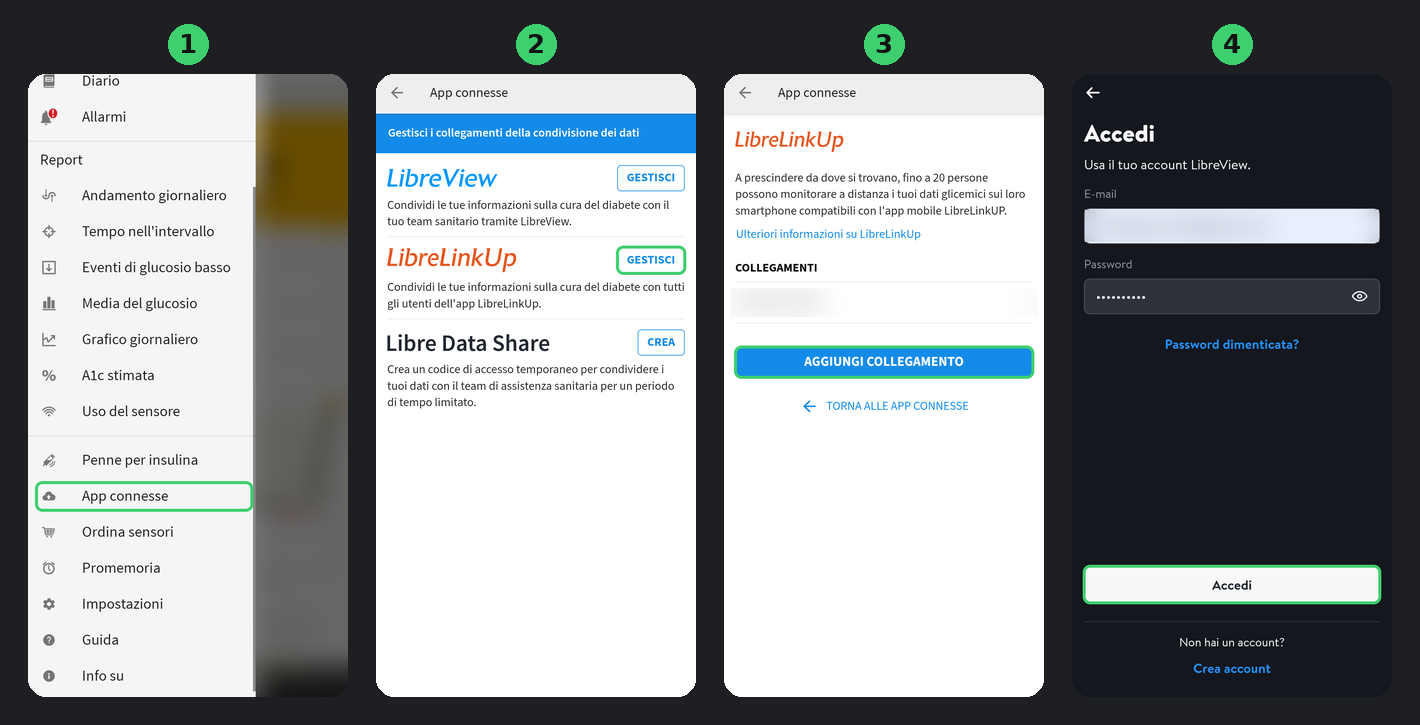
Works with Libre 2, Libre 3 and their Plus versions. You can also invite a family member's email and use that account in GlucoBar.
| Wrong email or password | Check that you can sign in to the LibreLinkUp app with the same email and password. |
| No patient linked | The invitation has not been accepted yet: accept it in LibreLinkUp, or send it again from LibreLink. |
| Accept the terms of use | Open LibreLinkUp, accept, then right-click GlucoBar and choose Refresh now. |
| The value stays grey | No new reading for 15 minutes: check that the phone is near the sensor and online. |
In the Dexcom app, turn on Share and invite at least one follower. GlucoBar reads the same data your followers see.
GlucoBar-Setup.exe always gives you the latest version. No administrator rights needed. Windows may say "Windows protected your PC" because the installer is not code-signed yet: click More info, then Run anyway.
Pick your sensor, tick where you want the value (with previews) and whether to start GlucoBar with Windows.
Choose Dexcom and enter your own Dexcom account, not the follower's: email, phone number with country code, or user name, and the password. Then choose where the account was created: in Europe and most other countries it is Outside the United States.
Works with Dexcom G6, G7 and ONE+ wherever Share is available. A G7 user has confirmed it works; G6 and ONE+ have not been tried yet.
A Dexcom sends a new reading every five minutes, so GlucoBar shows a new value about every five minutes too.
Dexcom support is still in beta: if it works for you, or if it doesn't, please tell us. Even "works fine" helps.
A Nightscout or Nocturne site that your sensor already uploads to, through xDrip+, Juggluco, AndroidAPS, Loop, Medtronic, Eversense or anything else.
GlucoBar-Setup.exe always gives you the latest version. No administrator rights needed. Windows may say "Windows protected your PC" because the installer is not code-signed yet: click More info, then Run anyway.
Pick your sensor, tick where you want the value (with previews) and whether to start GlucoBar with Windows.
Choose Nightscout or Nocturne and enter the site address, the one you open in the browser (for example https://yourname.herokuapp.com), and the token. Leave the token empty if the site is public.
GlucoBar only reads glucose entries from your site and never writes anything. The token stays encrypted in Windows Credential Manager.
New readings show up as soon as your uploader sends them; GlucoBar checks every minute by default, or as often as every 10 seconds.
Nightscout and Nocturne support is still in beta: please tell us whether it works with your setup.
The same as on Windows: FreeStyle Libre, Dexcom or Nightscout.
Download GlucoBar-mac.dmg, open it and drag GlucoBar onto Applications.
GlucoBar is not notarized by Apple yet, so macOS blocks it the first time: open System Settings → Privacy & Security, scroll to the message about GlucoBar and click Open Anyway. You only need to do this once.
Choose your sensor and enter the account, as on Windows.
On the Mac the value sits in the menu bar, next to the clock; click it for the GlucoBar menu. The small window and the desktop panel work as on Windows.
Needs a Mac with Apple silicon (M1 or newer) and macOS 11 or later. Turn on Open at login from the menu. Passwords are kept in the macOS Keychain.
Short answers. The full guide is on GitHub.
Yes, and it will stay free: no subscription, no paid features, no ads. The code is open source under the MIT licence. If you want to support it, there is an optional PayPal donation.
The installer is not code-signed yet, and SmartScreen warns about any program it has not seen often. The code and the build are public on GitHub, and every release lists the installer's SHA-256 and a link to its VirusTotal scan, so you can check the exact file.
It is stored encrypted in Windows Credential Manager (or the macOS Keychain) and is only sent to your sensor maker's servers or to your own Nightscout site. GlucoBar has no servers and no analytics.
No. It shows what the sharing service provides at the moment and keeps nothing on your PC. For history and reports, use LibreView, Clarity or Nightscout.
As far as the sharing service. GlucoBar checks every minute by default; you can choose anything from 10 seconds to 5 minutes. A FreeStyle Libre uploads a new value every minute, a Dexcom every five.
GlucoBar checks once a day and shows a message when there is one. One click installs it and keeps your settings, or turn on automatic installation in Settings → Updates.
No. Its alerts are optional and only work while your PC is on and online. Keep the alarms on your reader or phone.
GlucoBar gets better with your reports. You can write in English or Italian.
Something does not work as expected. A short form asks what happened and what you use.
Open an issueA feature you would like, or a sensor GlucoBar should support.
Share an ideaHelp with installing or setting up, or anything you are not sure about.
Ask in DiscussionsSee what has already been reported and what is being worked on.
View all issuesReporting a bug? Open a terminal and run glucobar report: it prints
what we need to help, with your email, password and readings hidden. Paste it into the form.
You need a free GitHub account to post.